Use AI to help YOU refactor your code
I was working on a small Blazor project this week and found myself in a familiar pattern.
I saw that the code needed refactoring, and had a vague sense of how I would go about it.
So I started extracting a few components here, renaming a few things there.
Until I reached the point I always reach, where I start second-guessing myself.
- Should the new Editor component fetch its own data, or get data passed to it via parameters?
- Where should the model types live?
- Does this warrant its own sub component or is it fine where it is?
Frustrated, I decided to get AI on the case.
Not to fix the problem for me, but to help me figure it out.
I fired up Claude Code, and started transcribing.
I talked about how I fall into this pattern, possibly because I’m self-taught and never did a Comp Sci degree.
The pattern is where I ‘feel’ my way through refactoring, and it typically works out OK, but I find myself second-guessing things.
I’m not always able to articulate why it’s better (unless some animated hand waving and mumbling about cohesion and coupling counts!)
I included a concrete example of the kind of refactoring I sometimes get stuck on, and finished up with this:
“What am I missing? What do you think? I want to focus on rubrics and concrete techniques to avoid hassle of the back and forth of trying to think this through - more, I guess, concrete refactorings or smells or guidance on how and when to take which approach.”
Claude came back with a response highlighting how I was circling around the idea of container vs presentational components (or smart vs dumb).
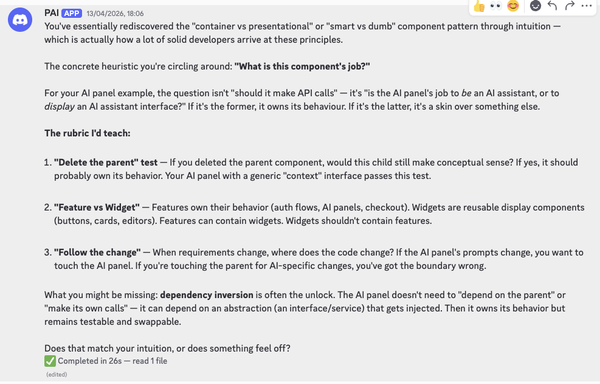
Now it’s important to say I do have an understanding of a lot of these concepts, built up over years of building for the web with various frameworks.
And that matters, because AI has been known to lie (like, all the time!)
But there’s always that little seed of doubt, that can lead to over (or under) engineering.
In this case I didn’t want Claude to give me general advice, but rather to work through a concrete example. So I asked it to come up with a component.
It generated a messy Blazor component (all the code in one file) and asked:
“Where do you want to start picking this apart? I’m thinking we walk through the questions someone should ask at each decision point, rather than just showing the “right” answer.”
I asked it to create a prompt to do this exercise with that specific example.
Armed with that prompt, over the next 15 minutes it asked me questions about the code, I gave answers, it connected my answers to core principles, and asked further questions where I needed a bit more nudging to figure it out.
The concrete result was a cleanly refactored component, split into smaller components, with clear separation of responsibilities and concerns.
And, perhaps more importantly, no second-guessing along the path to getting there.
Your mileage may vary#
Now the only problem with examples like this is that AI is non-deterministic, by definition.
Just because I had good results with this prompt doesn’t mean you will.
But the one thing we can always do with AI is experiment.
If you want to give it a go yourself you’ll find the example ‘messy’ component in this repo, alongside the prompt I used to walk through it.
Give it a go for yourself, and let me know how you get on (I used Claude Opus 4.5).
Oh, and one last thing. Did you spot the step I took before running the prompt? Where I told AI about a ‘weakness’ in my own skills, and asked it for help connecting the dots.
If my exact prompt doesn’t work for you, writing your own ‘meta prompt’ might be the real secret sauce.
— Jon
Your skills aren't becoming obsolete. They're becoming essential.
Practical engineering principles for building software that works - with or without AI.