AI broke your architecture? Here's how to fix it
Throw AI at your existing code base and it won’t always stick to your carefully designed architecture conventions.
That’s not to say it won’t try.
Claude Code, CoPilot, Codex, all have some mechanism to explore the existing code, and will often form a pretty good picture of how the code is structured.
But sooner or later they’ll still go and let themselves down and couple your controllers to your DB, despite all the other controllers going through a service layer first.
This is especially true if there’s any inconsistency in the existing code.
And, let’s face it, with a large codebase, maintained over a long period of time, you’ve probably got inconsistencies!
So if AI won’t always pick up on the conventions and the boundaries between modules - how do you get it to course-correct when it goes wrong?
Give AI guardrails and a way to check its work#
The way I think of this, it’s a bit like dropping a junior developer into a codebase, asking them to go to town on a feature, and expecting them to magically pick up on the project’s conventions.
Where should domain logic go? Which parts of the codebase should call data? Which shouldn’t?
A junior developer (or even just any developer who’s new to the project) might miss the patterns that are obvious to you.
And ultimately, AI is no different.
It will have a go, very enthusiastically I might add, but will still make mistakes, or guess when it isn’t sure.
Understanding Architecture Through Examples#
Here’s a simple example. The specific architecture here is irrelevant - this one happens to use layers, it could easily be vertical slices or any other architecture you’d find in a project.
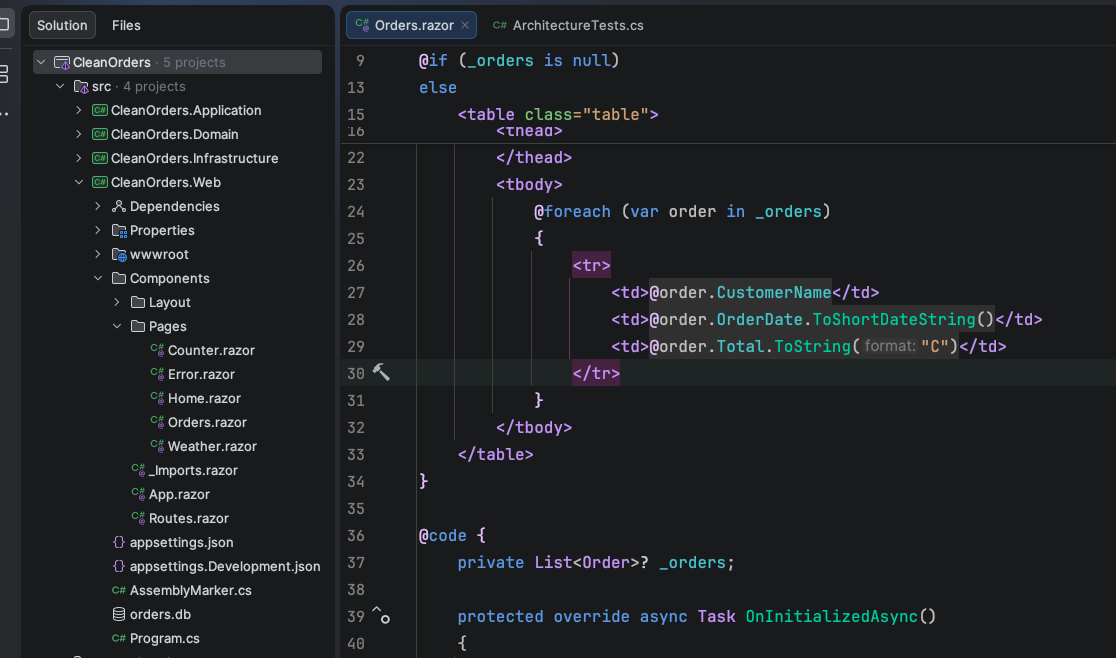
The important thing from an AI point of view is: Can it detect that architecture? Can it understand it by looking at examples of what’s already there?
In this case you’ve got your layers with classic rules:
- Web should only call
application - Application ultimately interacts with
domainandinfrastructure - Infrastructure shouldn’t get involved until you’re actually saving to a database
But while you’re aware of those rules, and you’ve spent enough time in the code to recognise them, there’s no guarantee that AI will spot them, especially in larger projects.
How AI Violates Architecture#
Despite all your guardrails, sooner or later AI is going to take a sledgehammer to your carefully architected application.
@page "/orders"@using CleanOrders.Infrastructure@using Microsoft.EntityFrameworkCore@inject AppDbContext Db
<h3>Recent Orders</h3>
@code {    private List<Order>? _orders;
    protected override async Task OnInitializedAsync()    {        // ❌ Bad: Database query directly in the component        _orders = await Db.Orders            .OrderByDescending(o => o.OrderDate)            .Take(10)            .ToListAsync();    }}
In this case it’s thrown in a quick database query right here in this component - layers be damned.
The Real Problem: Code Review Fatigue#
This would be annoying, but the real challenge is deeper.
If you’re getting into a regular cadence of AI generating code you’re probably finding the sheer amount of code you’re reading has shot up, and there comes a point where you just miss stuff.
The above example might seem fairly obvious - but someone’s going to let it through.
And suddenly you have a real problem: the next time AI explores your code base it sees this pattern and thinks “ah, that’s the pattern you’re using. I’ll just do the same thing.”
But this is all avoidable.
Enforce Boundaries with Architecture Tests#
Use NetArchTest (or similar tools) to enforce those boundaries automatically, with tests that say “if you violate this rule, the test fails”.
It’s simple to set these up, in this case using NetArchTest.
[Fact]public void Domain_Should_Not_Depend_On_Infrastructure(){    var result = Types.InAssembly(DomainAssembly)        .ShouldNot()        .HaveDependencyOn("CleanOrders.Infrastructure")        .GetResult();
    Assert.True(result.IsSuccessful,        Format("Domain", "Infrastructure", result));}
[Fact]public void Components_Should_Not_Depend_On_EFCore(){    var result = Types.InAssembly(WebAssembly)        .That()        .ResideInNamespaceStartingWith("CleanOrders.Web.Components")        .ShouldNot()        .HaveDependencyOn("Microsoft.EntityFrameworkCore")        .GetResult();
    Assert.True(result.IsSuccessful,        Format("Components", "EntityFrameworkCore", result));}
The first test enforces that the domain doesn’t directly interact with infrastructure code. The second prevents web components from directly accessing EF Core.
Running Architecture Tests with AI#
Of course, you can run these tests yourself, but it’s even more useful to have AI run them automatically.
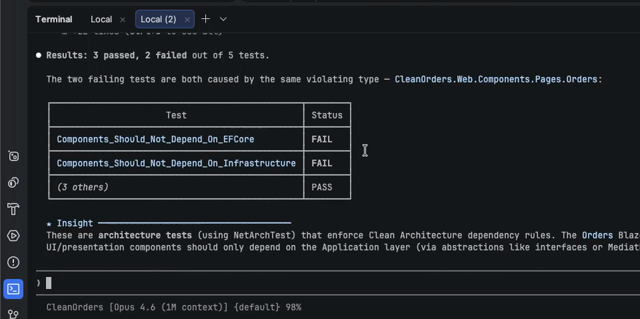
Have AI check its work by running these tests, and it can very easily course correct when it’s made a mistake.
In this case it will fail on two tests: components shouldn’t have a dependency on EFCore (no direct database access) and shouldn’t have a dependency on infrastructure (they should go through the application layer).
The Key Principle: Make Rules Enforceable#
What can you do with this?
Always consider: what is enforceable and, can be made deterministic?
What are the clear architectural rules for the project, and can you find a way to declare those in a testable way that AI (and human developers) can use to course correct when they make a mistake.
Tools like NetArchTest make this easy to set up, and enforce those boundaries, then give it to your AI as a constraint.
Put these tests in your CI/CD process and you’ll catch errors before they make it into your production code.
Your skills aren't becoming obsolete. They're becoming essential.
Practical engineering principles for building software that works - with or without AI.